
My Day
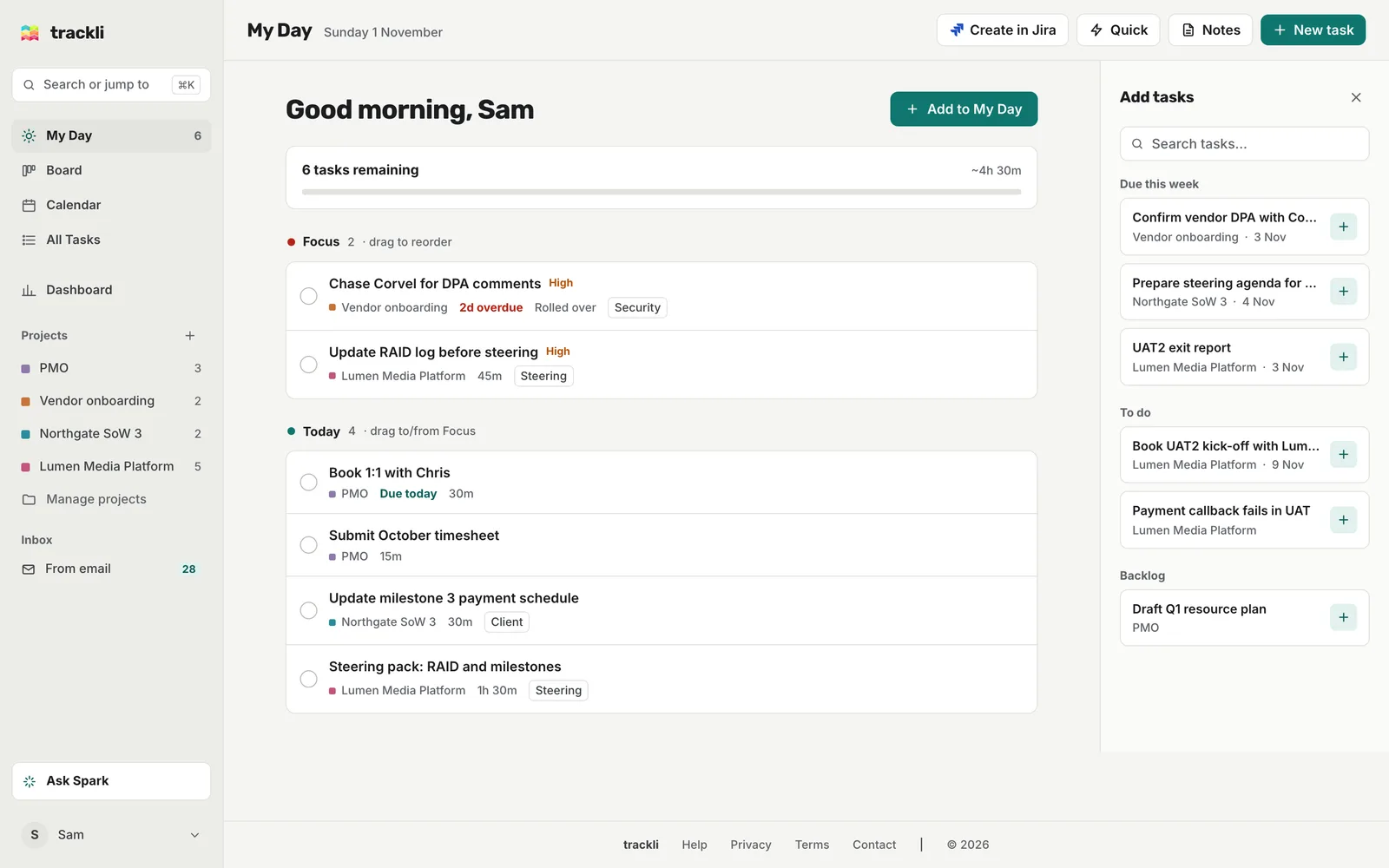
My Day is your list for today. It pulls together everything you need to get through, so you can work from one short list instead of the whole board. Open it from My Day in the sidebar, or the bottom bar on a phone.
What's on it
Trackli adds tasks to My Day for you when:
- They're due today or overdue
- Today is their start date, or today falls between their start and due dates
- You added them yourself today
Finished tasks drop off into Completed at the bottom, and the progress card at the top counts down what's left.
The sections
- Focus: high and critical priority tasks, plus anything overdue. Chase Corvel for DPA comments was due two days ago, so it's here.
- Today: everything else that's on for today, in start time order.
- In progress: tasks you've started that are still within their dates.
- Completed: what you've finished today.
Drag tasks up and down in Focus to put them in the order you'll tackle them. Drag a task from Today into Focus and it becomes high priority. Drag one from Focus back to Today and its priority is cleared (and if it was overdue, its due date moves to today).
Add tasks
On a computer, choose Add to My Day at the top. A panel opens with your other tasks grouped as Overdue, In progress, Due today / tomorrow, Due this week, To do and Backlog. Search or scroll, then click a task (or the plus next to it) to add it.
On a phone or tablet, tap the round sun button in the corner to open the same list.
You can also add a task from the Board, using the sun button on its card.
Work through your list
Tick the circle on a task to mark it done. Hover over a task on a computer for more:
- Tomorrow moves it to tomorrow's list
- The lock marks it blocked, with a reason and a return date
- The cross removes it from My Day for today
On a phone these show as Tomorrow, Blocked and Remove under each task.
Removing a task from My Day doesn't change its dates. It just leaves today's list, and comes back on another day if its dates still say so.
End of day
After 5pm, if anything's left, Trackli offers to help you wrap up. Choose Review and pick Tomorrow or Mark Done for each task, then Apply Changes. Choose Skip for Now if you'd rather leave it.
Unfinished tasks that are still due, overdue or within their dates stay on My Day the next day, with a "Rolled over" label. A task you added by hand without a date is only on that day's list, so add it again if you still need it.
Tips
- Clicking a project in the sidebar filters My Day to that project too.
- Dropping a task onto today in the Calendar also adds it to My Day.
- Want to see My Day tasks on the Board? Use the My Day quick filter there.