
Ask Spark
Spark is an assistant built into Trackli. You type a question or a request the way you'd say it to a colleague, and Spark answers from your tasks or makes the change for you.
Open Spark
- On a computer: choose Ask Spark at the bottom of the sidebar, or press
Cmd+Ctrl+S(Ctrl+Alt+Son Windows). - On a phone: tap the Spark button at the top of the screen, next to your avatar.
When the conversation is empty, Spark shows a few suggestions to get you started. Tap one, or type your own in Ask Spark anything...
Ask about your work
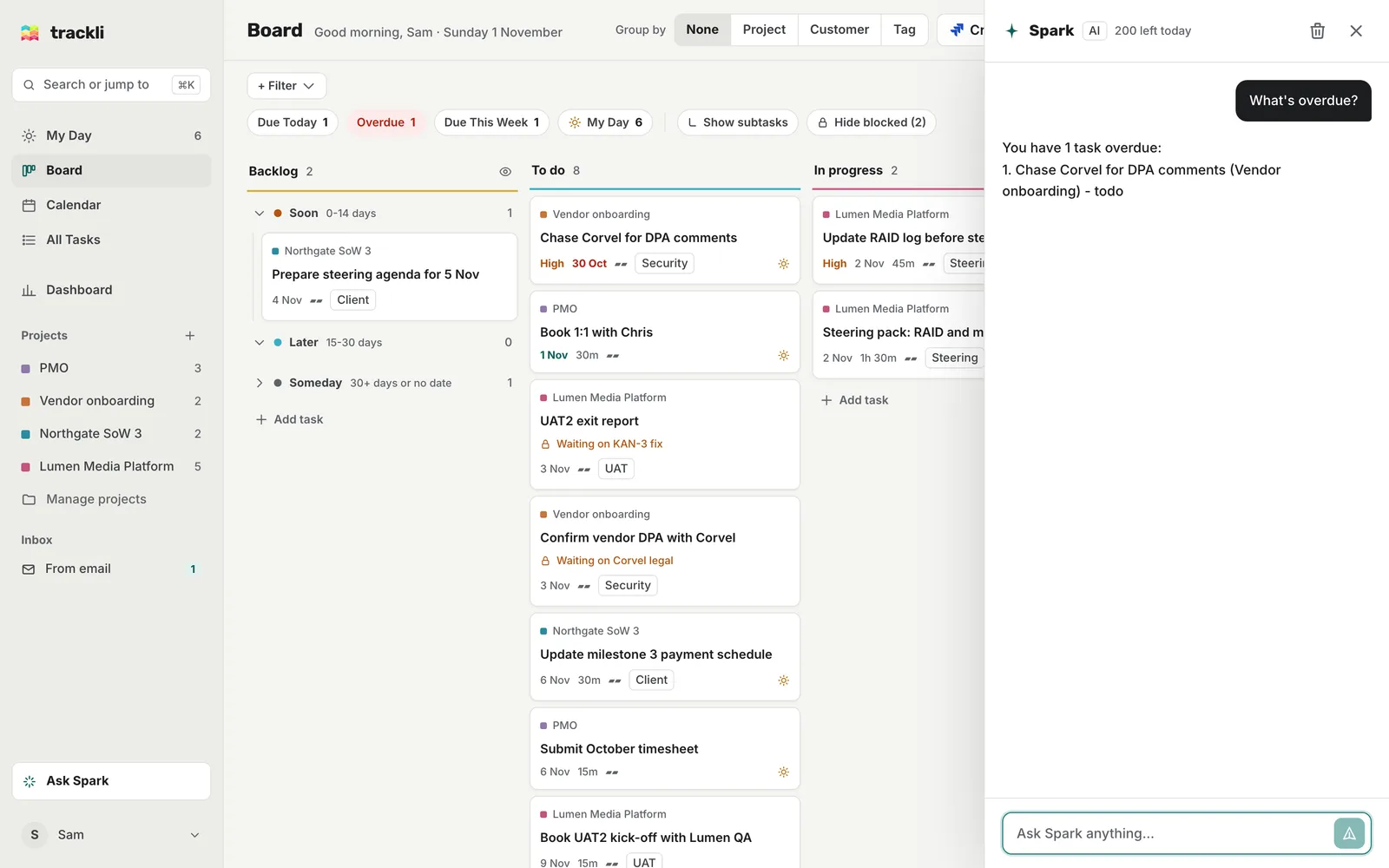
Spark can see your open tasks, and your calendar if you've connected one. Some things to try:
- "What's due today?"
- "What's overdue in Vendor onboarding?"
- "What's blocked?"
- "Show my high priority tasks"
- "What's in my day?"
- "When am I free tomorrow afternoon?"
- "What should I work on next?"
Ask it to make changes
Spark can create, update and complete tasks, including several at once:
- "Add a task to chase Corvel for DPA comments, due Friday, high priority"
- "Move Book 1:1 with Chris to tomorrow"
- "Add Update RAID log before steering to my day"
- "Schedule the RAID log update at 10 and the UAT2 kick-off booking at 2 tomorrow"
- "Mark Submit October timesheet done"
- "Add a subtask to UAT2 exit report: get sign-off from Lumen QA"
Before Spark changes a lot of tasks in one go, it asks you to Confirm. After a change, an Undo button shows for a few seconds so you can put things back.
Ask it to draft something
Spark can draft a short chaser or email from what's in your tasks, for example "Draft a chaser to Corvel about the DPA". It writes it ready for you to copy. It can't send it for you.
What Spark can't do
- Send emails or messages
- Delete tasks
- Set reminders
- Change your settings
If you ask for one of these, Spark tells you and suggests what it can do instead.
Tips
- Start fresh. The clear conversation button at the top of the panel wipes the chat and starts again.
- There's a daily limit. You can send Spark up to 200 messages a day. Simple questions like "what's due today?" are often answered straight away without counting towards it. If you need more, email support@gettrackli.com or use the Support page and we can raise it for you.
- Check important answers. Spark uses AI (Claude), so it can make mistakes. It's worth a quick look before you rely on an answer.
- Use Claude already? You can also connect Trackli to Claude and manage tasks from there.