
Use Trackli with Claude
Connect Trackli to Claude and you can manage your tasks in the same chat you're already working in. Ask what's due today, add the actions from a meeting, or move something into My Day, without switching over to Trackli.
It works in claude.ai, the Claude desktop and phone apps, and Claude Code.
Connect in claude.ai or the Claude apps
-
In Claude, open Customize, then Connectors.
-
Choose Add custom connector.
-
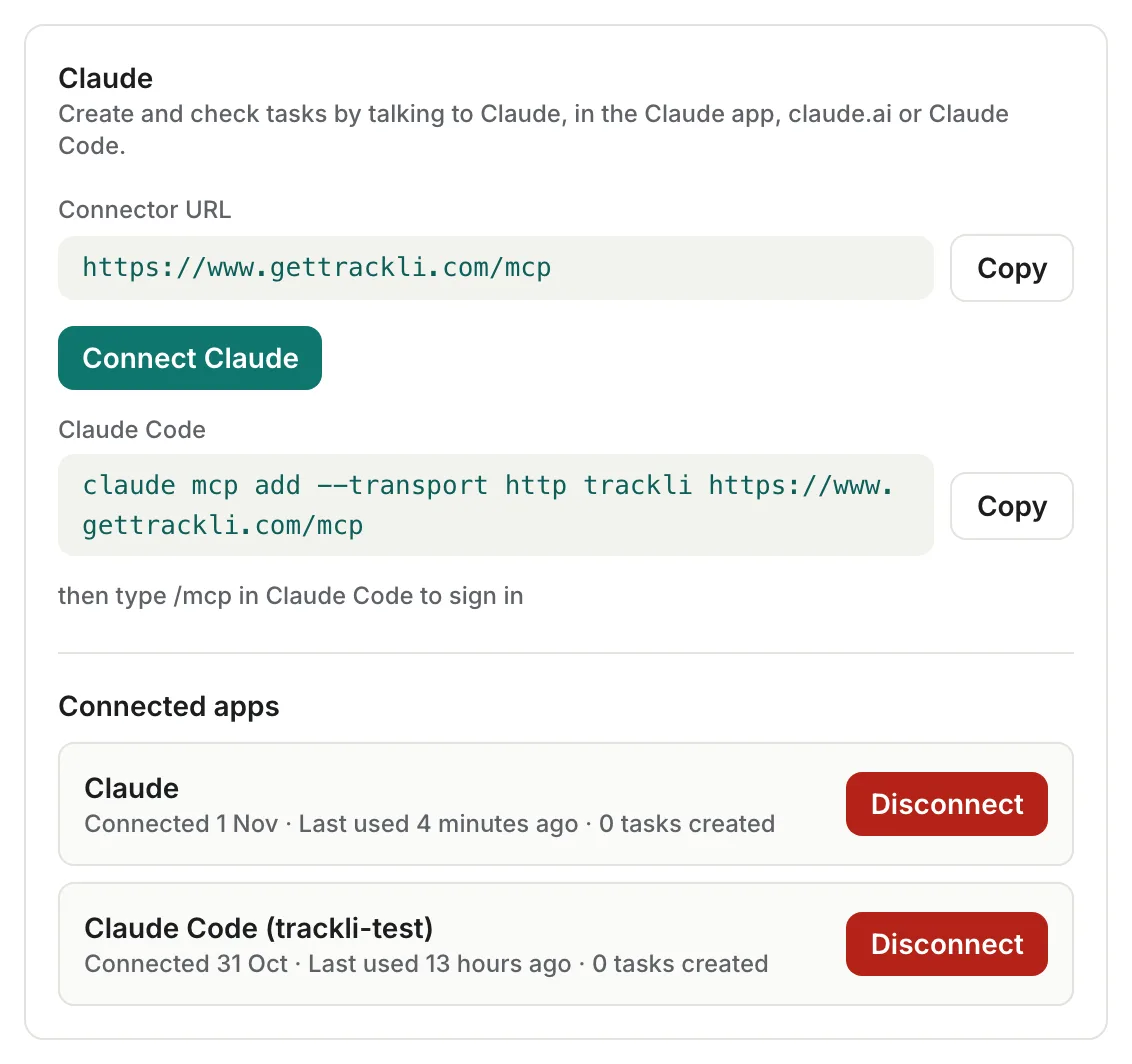
Paste this address and add it:
https://www.gettrackli.com/mcp -
Claude opens Trackli. Sign in if you need to.
-
Trackli shows you what Claude will and won't be able to do. Check it's your account, then press Allow.
That's it. Your connection carries over to the Claude apps on your other devices too.
You can also start from Trackli. Open Settings from your account menu, go to Integrations and find the Claude card. It has the address to copy and a Connect Claude button that opens Claude's connector settings.
Connect in Claude Code
-
Run this in your terminal:
claude mcp add --transport http trackli https://www.gettrackli.com/mcp -
In Claude Code, type
/mcp, choose trackli and sign in. -
Press Allow on the Trackli page that opens.
Things to ask
Talk to Claude the way you'd jot a note to yourself. A few examples:
- "What's on my plate today?" Claude reads your My Day, plus anything overdue, due today or in progress.
- "Add a task to chase Corvel for their DPA comments, due Friday, high priority."
- "Here are my notes from the steering meeting. Add my actions to Lumen Media Platform." Claude can add up to ten tasks at once.
- "Move Update RAID log before steering into My Day."
- "Mark UAT2 exit report blocked, waiting on the KAN-3 fix, back on Thursday."
- "Add to the notes on Prepare steering agenda for 5 Nov: Chris wants budget first."
- "What's overdue in Vendor onboarding?"
Every task Claude shows you comes with a link, so you can open it in Trackli in one click.
Claude asks before it changes anything
Claude can read your tasks without stopping to ask. Before it creates or changes anything, it asks for your permission, so you can check the task before it lands in Trackli.
If you get tired of approving the same thing (ex: adding tasks), you can set that tool to always allow in Claude's connector settings.
What Claude can and can't do
Claude can:
- See your projects and tasks, including subtasks, the same as you see them in Trackli
- Create tasks, with dates, times, priority, effort, tags, customer and assignee
- Update tasks, mark them done, and add to or remove them from My Day
- Mark tasks blocked with a reason and a return date, and unblock them
- Undo a task it created in the last 24 hours (the task is archived)
Claude can't:
- Delete tasks or projects
- Create or change projects, tags or customers. It uses the ones you already have, so check the name if Claude says it can't find one.
- See anything you couldn't see in Trackli yourself
A few things to know:
- Notes and descriptions are safe. If a task already has notes or a description, Claude adds to them rather than replacing them. It only replaces text when you ask it to.
- Tasks from Jira and other tools. On tasks linked to Jira, Linear, ClickUp, Asana or Monday.com, Claude can change My Day and effort only. For anything else, change it in that tool and it syncs back as usual. The same goes for blocking, since those tasks get their blocked state from the tool.
- Subtasks. Claude can change a subtask's title, status, start date and due date.
- You can always see what Claude did. Tasks Claude creates show "Created via Claude" in their Activity, and changes show "via Claude".
Disconnect
- Open Settings, then Integrations.
- Under Connected apps, choose Disconnect next to Claude.
Claude stops being able to use Trackli straight away. Tasks Claude created stay in Trackli. You can also remove Trackli from Claude's own connector settings.
Troubleshooting
- The sign-in page won't load at work. Signing in goes through our sign-in provider's address, which ends in
supabase.co. Some company networks block it. Try connecting from a different network (ex: your phone's hotspot), or ask your IT team to allow it. You only need to sign in once. - "This sign-in link has expired." Sign-in links only last a few minutes. Go back to Claude and connect again.
- "Too many Trackli requests in a short time." Claude can call Trackli up to 60 times a minute. Wait a minute and try again.
- Claude can't find a project, tag or customer. It has to match one you already have in Trackli. Ask Claude to list your projects to see the exact names.
Your data
Trackli only sends your task data to Claude when you ask Claude to use Trackli. It's then handled by Anthropic, which runs Claude, under their own terms. Trackli doesn't read your conversations with Claude. There's more detail in section 13.4 of our privacy policy.